Matomo Analytics: The Complete Guide to Privacy-Friendly Tracking
Matomo (formerly Piwik) is the leading open-source web analytics platform and the most popular alternative to Google Analytics. With over 1 million websites using it worldwide, Matomo offers something Google can’t: complete data ownership and privacy compliance out of the box.
This Matomo analytics guide covers everything you need to know — from understanding why organizations choose Matomo to setting it up and getting value from your data.
What is Matomo Analytics?
Matomo is a full-featured web analytics platform that tracks website visitors, their behavior, and conversions — similar to Google Analytics, but with a fundamental difference: you own your data.
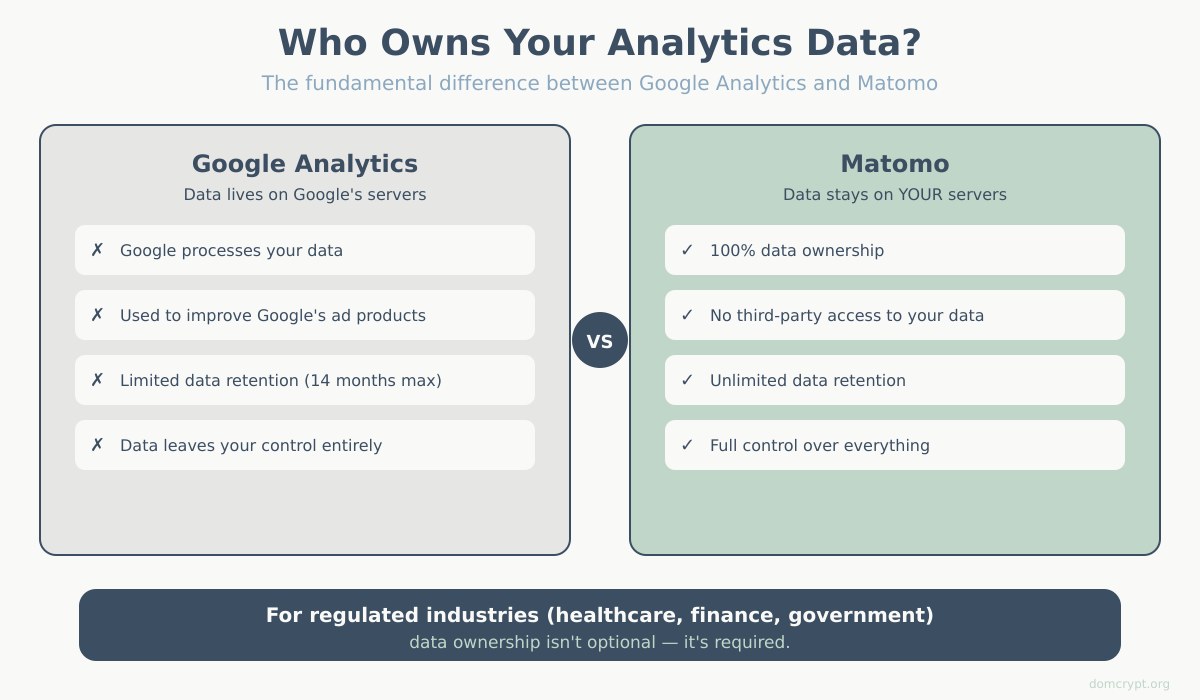
When you use Google Analytics, your visitor data lives on Google’s servers. Google processes it, stores it, and yes — uses it to improve their advertising products. With Matomo, your data stays under your control.
Key facts about Matomo:
- Founded in 2007 as Piwik, rebranded to Matomo in 2018
- Open-source (GPLv3 license) — you can inspect and modify the code
- Used by over 1 million websites including the European Commission, United Nations, and NASA
- Available as self-hosted (free) or cloud-hosted (paid)
- Tracks all standard analytics metrics: users, sessions, pageviews, conversions, and more
Why Organizations Choose Matomo Analytics
The shift toward Matomo isn’t just about avoiding Google. There are concrete business reasons why organizations make the switch.
1. Complete Data Ownership
With self-hosted Matomo, your analytics data never leaves your servers. No third party can access it, sell it, or use it to build advertising profiles. For organizations handling sensitive data — healthcare, finance, legal, government — this isn’t optional; it’s required.
2. GDPR and Privacy Compliance
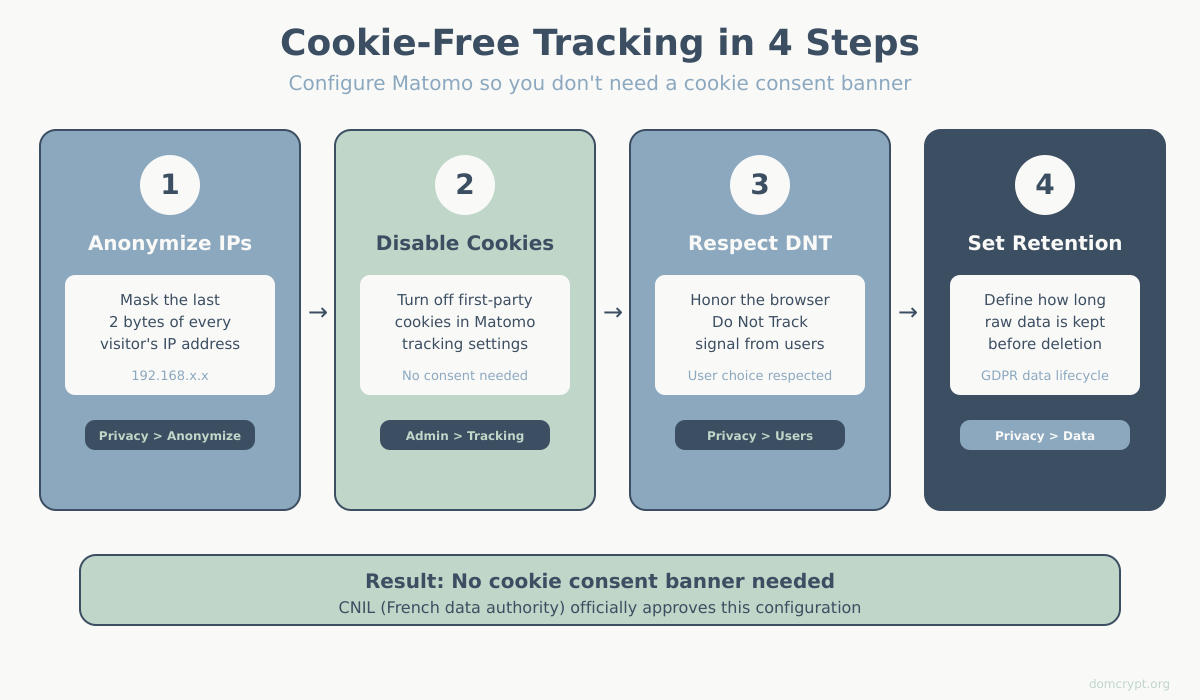
Matomo is designed with GDPR compliance built in. The French data protection authority (CNIL) has officially recognized Matomo as a tool that can be used without cookie consent when configured correctly.
This means: no annoying cookie banners asking visitors to accept tracking. Fewer banners = better user experience = more accurate data.
3. No Data Sampling
Google Analytics samples your data on high-traffic sites (free tier). This means it analyzes a subset and extrapolates. Matomo processes 100% of your data, always. What you see is what actually happened.
4. No Data Limits
GA4 has data retention limits (14 months max for user-level data). Self-hosted Matomo keeps your data forever — or as long as you want. Build year-over-year comparisons without losing historical context.
5. Full Feature Access
Many “premium” features in other analytics tools come standard in Matomo: heatmaps, session recordings, A/B testing, funnels, and custom reports. Some require the premium plugin, but the core platform is remarkably complete.
Matomo Cloud vs Self-Hosted: Which to Choose
Matomo offers two deployment options. Your choice affects cost, control, and maintenance burden.
Matomo Cloud (Hosted)
Matomo Cloud is the managed service. Matomo handles hosting, updates, backups, and security.
Pricing: Starts at €23/month for up to 50,000 hits. Scales with traffic.
Best for:
- Teams without server management expertise
- Organizations that want data ownership but not infrastructure responsibility
- Quick setup — tracking within minutes
Considerations:
- Data is stored on Matomo’s EU servers (still better than Google, but not your own infrastructure)
- Monthly costs can add up for high-traffic sites
- Some advanced features require additional payment
Matomo Self-Hosted (On-Premise)
Self-hosted Matomo runs on your own servers. You download, install, and maintain it yourself.
Pricing: Free. You pay only for your server infrastructure.
Best for:
- Organizations with strict data residency requirements
- Teams with DevOps/sysadmin capabilities
- High-traffic sites where cloud pricing becomes expensive
- Maximum control over data and infrastructure
Considerations:
- Requires PHP 7.2+, MySQL/MariaDB, and a web server
- You handle updates, backups, and security patches
- Performance tuning needed for high-traffic sites
Quick Comparison
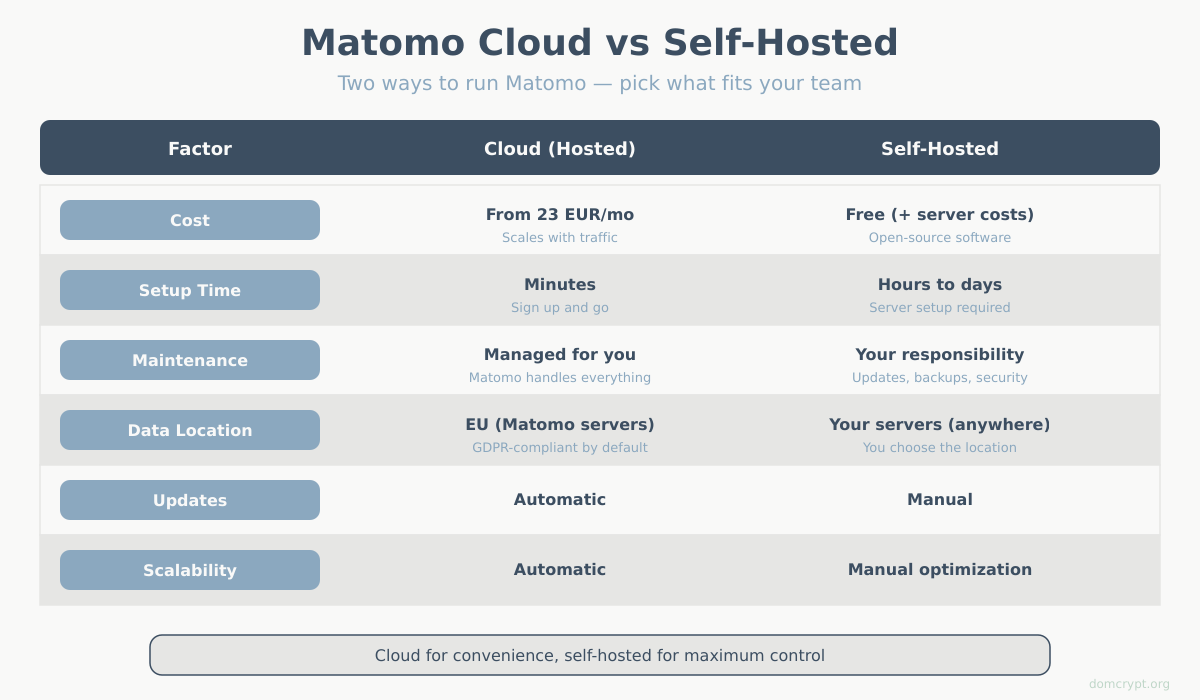
| Factor | Matomo Cloud | Self-Hosted |
|---|---|---|
| Cost | €23+/month | Free (+ server costs) |
| Setup time | Minutes | Hours to days |
| Maintenance | None (managed) | Ongoing (your responsibility) |
| Data location | EU (Matomo servers) | Your servers (anywhere) |
| Scalability | Automatic | Manual (optimize as needed) |
| Updates | Automatic | Manual |
Core Features of Matomo Analytics
Matomo isn’t a stripped-down alternative — it’s a full analytics suite. Here’s what you get:
Standard Analytics
Everything you’d expect from a web analytics platform:
- Visitors — unique visitors, returning visitors, visit duration
- Behavior — pageviews, bounce rate, site search, downloads
- Acquisition — traffic sources, campaigns, referrers, search keywords
- Geo-location — countries, regions, cities
- Technology — browsers, devices, screen resolutions, operating systems
Goals and Conversions
Track conversions just like GA4:
- URL-based goals (visited a specific page)
- Event-based goals (clicked a button, submitted a form)
- Download tracking
- Outlink tracking
- E-commerce tracking with revenue attribution
Funnels and User Flow
Visualize how visitors move through your site:
- Multi-step funnels for checkout processes
- Drop-off analysis at each step
- Conversion path visualization
Heatmaps and Session Recordings (Premium)
See exactly how visitors interact with your pages:
- Click heatmaps — where users click
- Scroll heatmaps — how far users scroll
- Session recordings — replay individual visits
Tag Manager
Matomo includes its own tag manager (free), similar to Google Tag Manager. Manage all your tracking scripts without touching code.
Custom Reports and Dashboards
Build reports tailored to your needs:
- Custom dimensions and metrics
- Scheduled email reports
- Dashboard widgets you can rearrange
- API access for external integrations
Installing Matomo Analytics: Self-Hosted Setup
If you’re going the self-hosted route, here’s what the process looks like:
Requirements
- Web server (Apache, Nginx)
- PHP 7.2.5 or higher (8.x recommended)
- MySQL 5.5+ or MariaDB
- At least 128MB RAM (more for high traffic)
Basic Installation Steps
- Download Matomo from matomo.org/download
- Upload files to your web server
- Create a database for Matomo
- Run the installer — visit your Matomo URL in a browser
- Configure your first website — add site name and URL
- Install tracking code — copy JavaScript snippet to your website
The web-based installer guides you through each step. Most installations take 15-30 minutes.
WordPress Integration
For WordPress sites, the process is even simpler:
- Install the official Matomo for WordPress plugin
- Choose self-hosted or connect to Matomo Cloud
- Tracking starts automatically
Matomo vs Google Analytics 4: Honest Comparison
Both platforms track web analytics. Here’s how they actually compare:
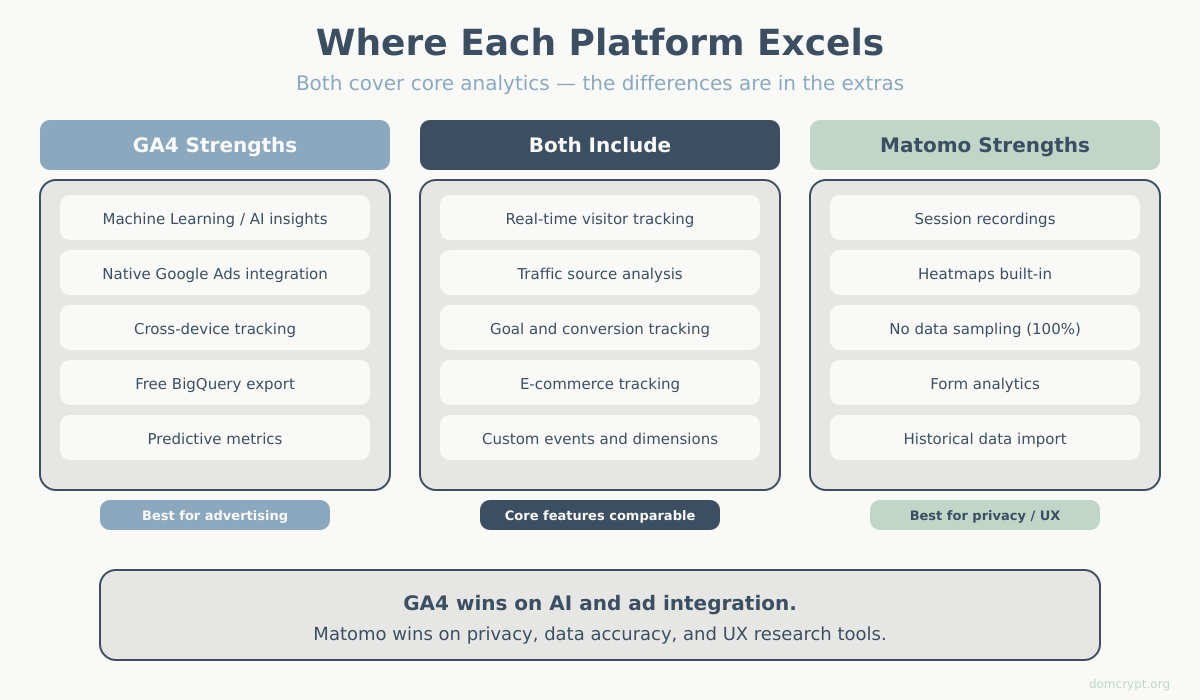
Choose Matomo if: Privacy and data ownership are priorities, you’re in a regulated industry, or you want to avoid consent banners.
Choose GA4 if: You heavily use Google Ads, need advanced machine learning features, or want a completely free solution with zero maintenance.
Not sure? Read our detailed guide to choosing an analytics platform.
Matomo Analytics Best Practices
Getting the most from Matomo requires proper configuration:
Privacy Configuration
To use Matomo without cookie consent (where legally permitted):
- Enable “Anonymize IP addresses” (mask last 2 bytes)
- Disable “Use cookies” in tracking settings
- Enable “Respect Do Not Track”
- Configure data retention policies
Performance Optimization
For self-hosted installations:
- Enable archiving via cron job (don’t process reports on-demand)
- Use a dedicated database server for high traffic
- Configure proper MySQL indexes
- Enable browser caching for the dashboard
Security Hardening
- Keep Matomo updated — security patches are released regularly
- Use HTTPS for both dashboard and tracking
- Restrict dashboard access by IP or VPN
- Enable two-factor authentication
- Regular database backups
Getting Started with Matomo Analytics
Ready to try Matomo? Here’s your path:
For quick evaluation:
- Sign up for Matomo Cloud free trial (21 days)
- Add your website
- Install tracking code
- Explore the interface with real data
For self-hosted setup:
- Ensure your server meets requirements
- Download and install Matomo
- Configure privacy settings
- Set up automated archiving
- Import historical data from GA (optional)
Summary
Matomo analytics offers what Google Analytics can’t: complete data ownership, genuine privacy compliance, and freedom from third-party data processing.
It’s not the right choice for everyone. If you rely heavily on Google Ads or need Google’s machine learning capabilities, GA4 might serve you better. But for organizations that value privacy, operate in regulated industries, or simply want control over their data — Matomo is the most mature and feature-complete alternative available.
The analytics features are on par with GA4. The privacy features are better. And with the self-hosted option, you never have to wonder who else is looking at your data.